We've added a brand new section to our cloud-based music scheduler to help keep your library data safe - Back up and restore!
So whether you want to keep a copy of your data for safe keeping, or need to fix things after an inadvertent change, we've got you covered.
Backups
Automatic backups will be taken of your library every day. For existing users, we've set this to an overnight hour based on your stations - but you can adjust when this happens.
We'll store the last 8 backups on our cloud servers for easy access - that gives you a chance to fix anything from the last week. If you'd like to keep any of those backups for longer, it's really easy. You can download any of those backups and keep them somewhere safe.
If you're about to make a big change to your library but are worried something might go wrong - you can also take a manual backup at any time. We'll keep the most recent manual backup as part of our cloud storage, but like the automatic ones, you can download it at any time.
The backups include the full contents of your library - that includes your clocks, logs, categories, audio items, rules and more.
And if you accidentally delete your entire library? Don't worry, we'll keep backups of those libraries for 30 days.
Restoring a backup
If you need to roll back changes you've made, that's where restoration comes in.
Either select a backup we've stored in the cloud - or upload one from your own machine. You can then choose to use that backup to replace an existing library, or create a new one (if your current subscription allows you to create another).
This will then restore the entire library back to how it was at the time of the backup. If you need to, you'll be asked to map stations within Aiir to the stations of your backup.
One exciting thing is that Aiir Scheduler backups can be shared with other organizations within Aiir. So if you're a music consultant wanting to roll out a format, you export a backup and upload it to your client's account - or if there's a change in ownership for a station, it's easy to bring a new one in or spin it off as you need.
You can find all the options from the main dashboard of Scheduler, with the new 'Back up or Restore' option in the main menu.
It can also be accessed when you're in a library. In the top right hand corner, next to Settings, you'll see a new Tools option. We've moved a couple of things in there to help keep things nice and organized, along with the new backup options.
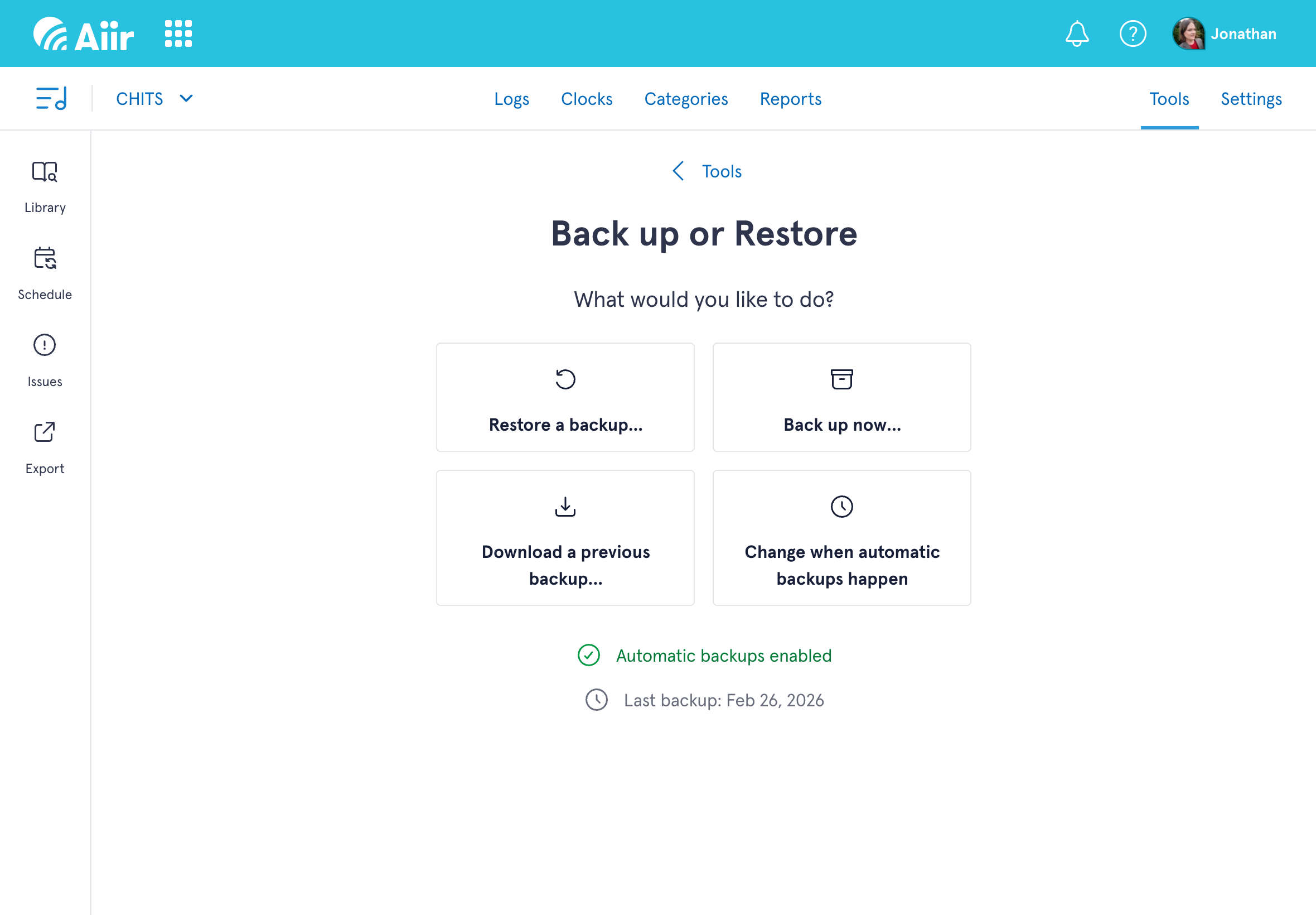
Our step-by-step process will walk you through whatever you're looking to do. And if you need any help, our Support Docs & Guides site has a full tutorial for backups with all the additional detail you may need.
We hope the new back up and restore section helps you schedule with confidence - and lets you experiment and develop your formats.
Our music scheduler is available now for just $60/£40 per station, per month - and there's a no commitment, 14-day free trial available. Import your existing data and see how easy it is to use! You can find our more on the Scheduler section of our website.